Keyboard
GDevelop gives access to all inputs made on the keyboard. This includes conditions to check if a key was pressed or released.
Note
Keyboard conditions do not work with on-screen keyboards on touch devices. For mobile or touchscreen games, use mouse/touch conditions instead.
Key pressed vs. Key just pressed
There are two similar but distinct conditions for detecting a key press:
- Key pressed — Returns
trueon every frame as long as the key is held down. Use this for continuous actions like moving a character while a direction key is held. - Key just pressed — Returns
trueonly on the single frame the key is first pressed. Use this for one-shot actions like jumping, shooting, or opening a menu, where you want the action to fire exactly once per key press.
Using "Key pressed" for a jump action, for example, would cause the character to jump repeatedly every frame while the key is held. "Key just pressed" triggers the jump only once until the key is released and pressed again.
Key released
The Key released condition returns true on the single frame a key is let go. Use it to trigger events at the moment of release, such as releasing a charged attack.
Any key pressed / Any key released
The Any key pressed and Any key released conditions are true when any key on the keyboard is currently pressed or has just been released. These are useful for "press any key to continue" screens.
Key names (text expression conditions)
The key conditions accept key names as text strings. For example, use "Left" for the left arrow key, "Space" for the spacebar, or "A" for the A key.
Danger
Make sure the key name is surrounded by quotes.
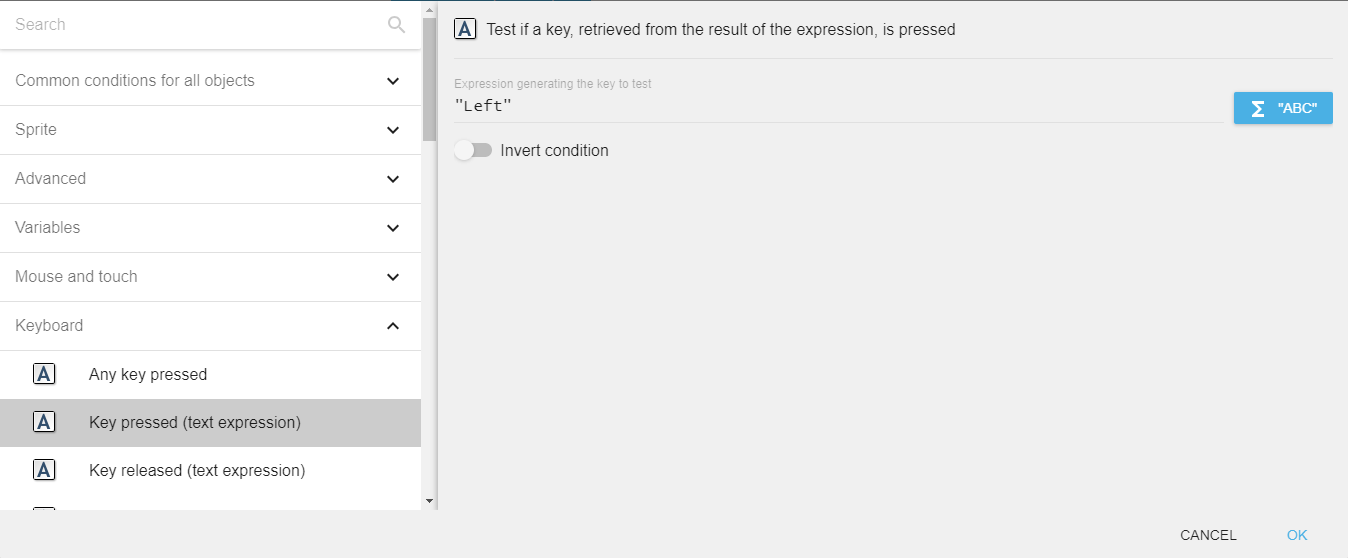
Common key name examples: "Left", "Right", "Up", "Down", "Space", "Return", "Escape", "Shift", "Control", "A"–"Z", "F1"–"F12", "Numpad0"–"Numpad9".
LastPressedKey expression
The LastPressedKey$() expression returns the name of the most recently pressed key as a string. For example, if the left arrow key was last pressed, the expression returns "Left". This is useful for displaying key hints or for remapping controls.
Reference
All actions, conditions and expressions are listed in the keyboard reference page.